
图片拖动验证
思路
初始化
随机生成背景图:随机选取背景图
计算空白块的位置: 空白块的位置也是随机的,x方向只能在右半区域,y方向就是背景图高度-空白快高度
计算拖动块的位置: 拖动块x初始位置为0 y方向和空白块保持一致。
其他设置:初始title文字,颜色
交互
点击滑块:设置一些基础状态,绑定按钮mousemove和document的mouseup事件
移动滑块:计算移动位置、同步滑块和滑动块的位置,边界判断
松开滑块:验证是否通过、清除对应的事件绑定,设置元素状态和文字。
拖动按钮的距离计算
要弄清楚如何计算拖动按钮的距离。如下图:
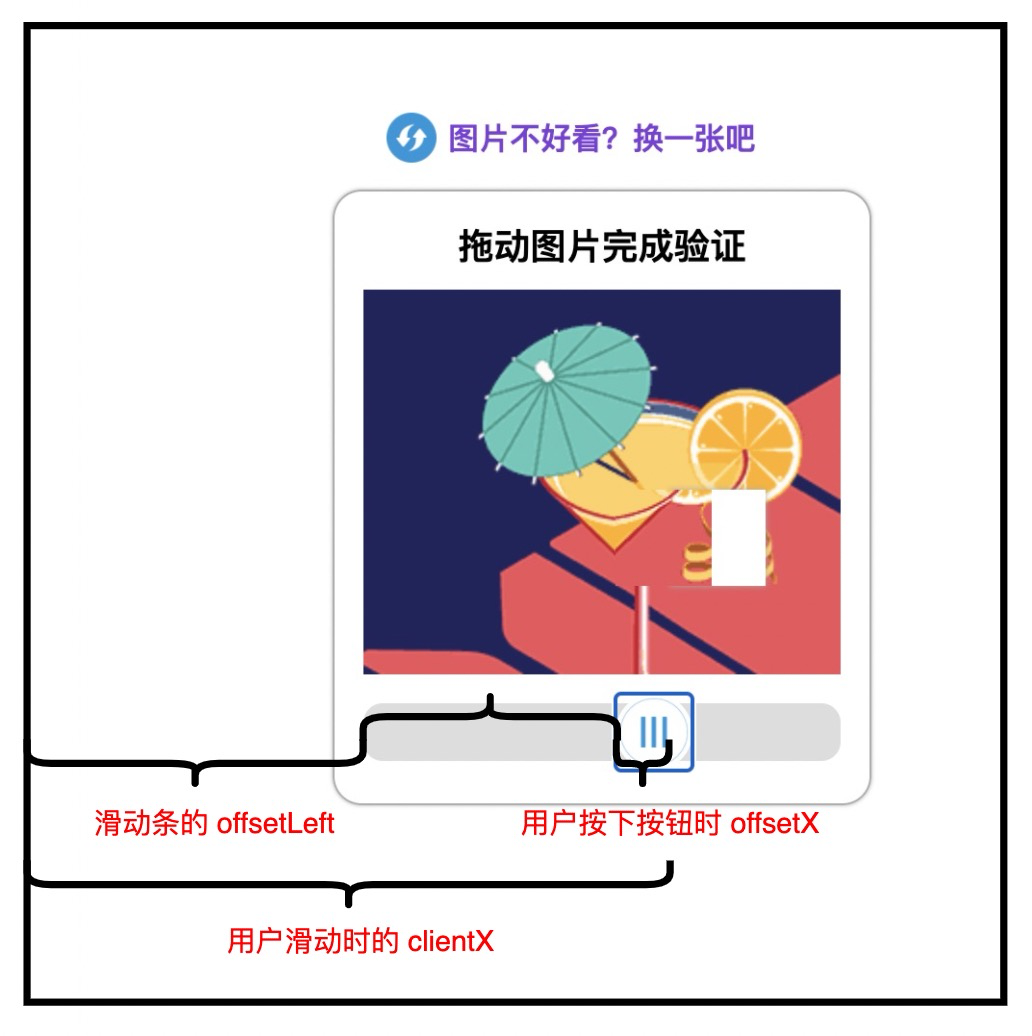
用户之所以可以按住按钮实时的进行滑动,实际上就是在不停的修改按钮的 left 值。
那么实时的得到按钮最新的 left 值就是一个非常重要的点。
按钮实时的 left 值计算 = 滑条的 clientX - 滑条的 offsetLeft - 按钮的 offsetX
ps: 滑块松开后会有一个缓慢返回的效果,使用transition来实现即可,但是要注意的是,每次点击滑块都要清除掉transition,否则会出现滑动不同步的问题。
实践
html
<!DOCTYPE html>
<html lang="en">
<head>
    <meta charset="UTF-8">
    <meta http-equiv="X-UA-Compatible" content="IE=edge">
    <meta name="viewport" content="width=device-width, initial-scale=1.0">
    <title>图片拖动验证</title>
    <link rel="stylesheet" href="../css/index.css">
</head>
<body>
    <!-- 最外层的容器 -->
    <div class="container">
        <!-- 上方的切换图片部分 -->
        <p class="changeImg">图片不好看?换一张吧</p>
        <!-- 图片容器 -->
        <div class="imgContainer">
            <!-- 标题 -->
            <h3>请完成图片验证</h3>
            <!-- 图片区域 -->
            <div class="imgBox">
                <!-- 可以拖动的图片块 -->
                <div class="imgBlock"></div>
                <!-- 需要填补的图片缺口 -->
                <div class="imgGap"></div>
            </div>
            <!-- 滑动块 -->
            <div class="slider">
                <span>拖动滑块完成拼图</span>
                <button type="button" id="btn"></button>
            </div>
        </div>
    </div>
    <script src="../js/myIndex.js"></script>
</body>
</html>
css
/* 整体容器的样式 */

.container {
    width: 280px;
    height: 400px;
    margin: 100px auto;
}

/* 上方的图片不好看切换一张的样式 */

.container .changeImg {
    text-align: center;
    position: relative;
    font-size: 16px;
    color: rgb(126, 57, 218);
    font-weight: bolder;
    cursor: pointer;
    user-select: none;
}

/* 前面的图标 */

.changeImg::before {
    content: '';
    display: block;
    position: absolute;
    left: 10%;
    top: calc(50% - 13px);
    width: 26px;
    height: 26px;
    background: url('../img/sx.png') no-repeat;
    background-size: cover;
    background-position: center;
}

/* img 容器整体样式,包含标题 + 图片 + 滑条 */

.imgContainer {
    height: 320px;
    box-sizing: border-box;
    padding: 15px;
    border: 1px solid #adadad;
    box-shadow: 0px 0px 2px #adadad;
    /* 设置盒子阴影 */
    border-radius: 15px;
    /* 设置圆角 */
}

/* 上方标题 */

.imgContainer h3 {
    text-align: center;
    margin: 0;
    margin-bottom: 10px;
}

/* 中间的图片 */

.imgContainer .imgBox {
    width: 100%;
    height: 200px;
    background-repeat: no-repeat;
    position: relative;
}

/* 可以拖动的图片 */

.imgBox .imgBlock {
    width: 50px;
    height: 50px;
    position: absolute;
    z-index: 10;
    opacity: 0;
}

/* 图片缺口 */

.imgBox .imgGap {
    width: 50px;
    height: 50px;
    position: absolute;
    background-color: white;
    box-shadow: 0px 0px 3px #adadad;
    /* 设置盒子阴影 */
}

/* 滑动条 */

.slider {
    width: 100%;
    height: 30px;
    margin: auto;
    margin-top: 15px;
    background-color: #ddd;
    border-radius: 10px;
    position: relative;
    text-align: center;
    line-height: 30px;
    font-size: 14px;
    font-weight: 200;
}

/* 滑动条的按钮 */

.slider button {
    position: absolute;
    top: -5px;
    left: -2px;
    background: white url('../img/yz.png') no-repeat;
    background-size: 100%;
    border-radius: 50%;
    border: 0;
    width: 40px;
    height: 40px;
    cursor: pointer;
    z-index: 20;
}

/* 滑动条文字的样式 */

.slider span {
    transition: all .5s;
}
js
/* 工具 */
// 选择器
function $(selector) {
    return document.querySelector(selector);
}

// 随机数
function getRandom(min, max) {
    return Math.floor(Math.random() * (max - min) + min);
}


/* 初始化 */
const doms = {
    imgBox: $('.imgBox'),// 图片容器
    imgBlock: $('.imgBlock'),// 可以拖动的图片
    imgGap: $('.imgGap'),// 图片缺口
    title: $('.imgContainer h3'),// 获取标题
    slider: $('.slider'),// 滑块条
    btn: $('#btn'),// 拖动的滑块
    span: $('.slider span'),// 滑块条的文字
    changeImg: $(".changeImg")//更换图片
}

function init() {
    // 随机生成背景图
    const imgArr = ['t1.png', 't2.png', 't3.png', 't4.png', 't5.png'];
    const src = getRandom(0, imgArr.length);

    // 计算空白块的位置
    const xRange = doms.imgBox.offsetWidth / 2 - doms.imgGap.offsetWidth;
    const yRange = doms.imgBox.offsetHeight - doms.imgGap.offsetHeight;
    const dx = getRandom(xRange + doms.imgBox.offsetWidth / 2, xRange);
    const dy = getRandom(0, yRange);

    // 设置背景
    doms.imgBox.style.backgroundImage = `url('../img/${imgArr[src]}')`
    doms.imgBlock.style.backgroundImage = `url('../img/${imgArr[src]}')`

    // 设置空白块位置
    doms.imgGap.style.left = `${dx}px`;
    doms.imgGap.style.top = `${dy}px`;
    doms.imgGap.style.opacity = 1;

    // 设置拖动块背景和位置
    doms.imgBlock.style.left = `0px`;
    doms.imgBlock.style.top = `${dy}px`;
    doms.imgBlock.style.backgroundPositionX = `-${dx}px`;
    doms.imgBlock.style.backgroundPositionY = `-${dy}px`;
    doms.imgBlock.style.opacity = 0;

    // 其他初始设置
    doms.btn.style.left = '-2px';//滑块初始位置
    doms.span.style.opacity = 1;//滑块区域内文字
    doms.title.style.color = '#333';
    doms.title.innerHTML = '请完成图片验证'
}

init();


/* 交互 */
// 点击滑块
function sliderClick(e) {
    doms.imgBlock.style.opacity = 1;//显示滑动块
    doms.title.innerHTML = `拖动图片完成验证`;//设置标题
    doms.title.style.color = "#333";//设置标题颜色
    doms.span.style.opacity = 0;//隐藏滑块文字
    doms.imgBlock.style.transition = 'none';//清空滑动块过渡
    doms.btn.style.transition = 'none';//清空按钮过渡
    // 绑定事件
    doms.btn.onmousemove = (ev) => (move(e, ev));//绑定移动事件
    document.onmouseup = sliderFree;//绑定松开鼠标事件
}

// 松开滑块
function sliderFree() {
    // 校验
    const diff = doms.imgGap.offsetLeft - doms.imgBlock.offsetLeft;//获取两个图块的差值
    const isPassed = diff < 5 && diff > -5;

    // 校验成功
    if (isPassed) {
        doms.title.innerHTML = `校验成功`;
        doms.title.style.color = "#008c8c";
        doms.imgBlock.style.opacity = 0;
        doms.imgGap.style.opacity = 0;
        doms.slider.onmousemove = null;
        doms.btn.onmousedown = null;
        document.onmouseup = null;
        return
    }

    // 校验失败
    doms.imgBlock.style.transition = 'all .5s';//添加过渡
    doms.btn.style.transition = 'all .5s';//添加过渡
    doms.imgBlock.style.left = "0px";//恢复初始位置
    doms.btn.style.left = "-2px";
    doms.title.innerHTML = `校验失败`;//设置失败文字
    doms.title.style.color = "#f55";
    doms.span.style.opacity = 1;//显示滑块区域文字
    doms.btn.onmousemove = null;
    document.onmouseup = null;
}

// 移动
function move(clickEv, mouveEv) {
    let dx = mouveEv.clientX - doms.slider.offsetLeft - clickEv.offsetX;
    const min = -2;
    const max = doms.imgBox.offsetWidth - doms.imgBlock.offsetWidth;

    // 边界处理
    dx < min && (dx = min);
    dx > max && (dx = max);

    // 设置滑块和滑动块位移
    doms.btn.style.left = `${dx}px`;
    doms.imgBlock.style.left = `${dx}px`;
}

// 绑定事件
doms.slider.onmousedown = sliderClick;
doms.changeImg.onclick = init;