
图示元素的DOM位置
dom 尺寸和位置


调用
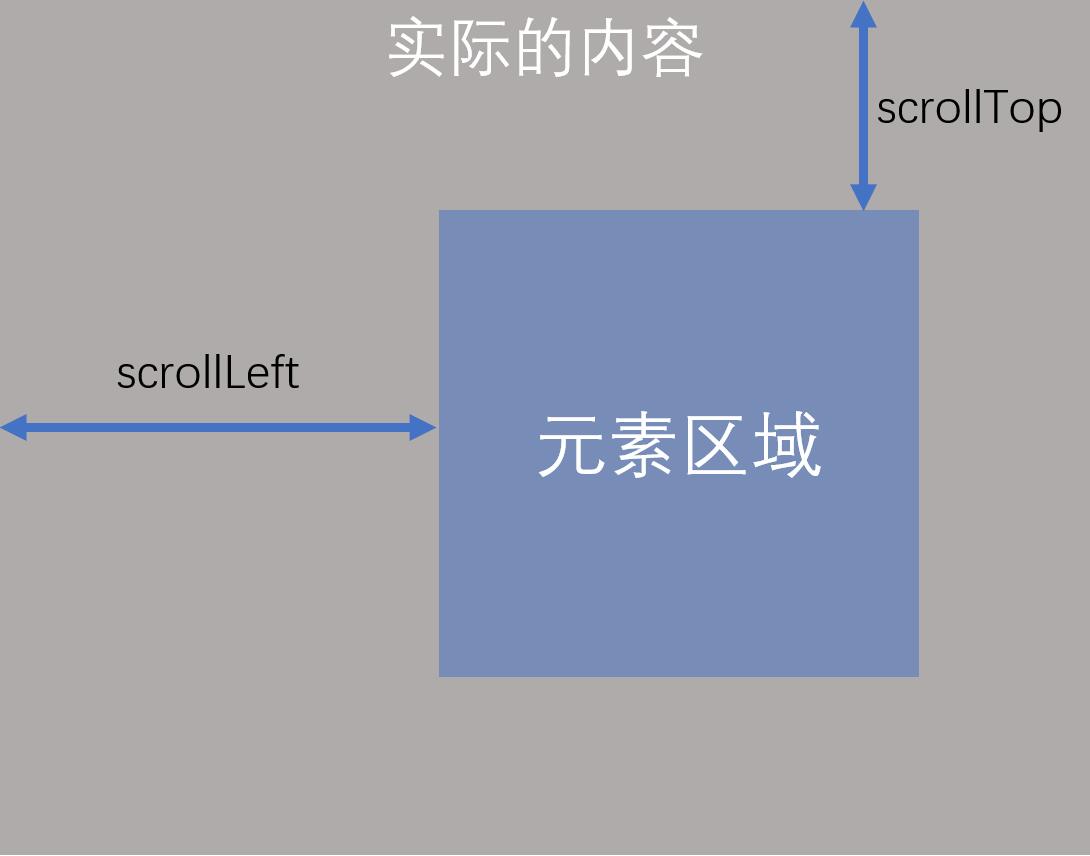
dom.scrollTo(x, y)可以设置元素的滚动位置,x 和 y 分别表示 scrollLeft 和 scrollTop该方法通用元素回到元素顶部
dom.scrollTo(0, 0)如果要监听元素的滚动,可以监听事件类型:==scroll==
Element.getBoundingClientRect()

上图中的 top、left、right、bottom 均相对于视口
汇总
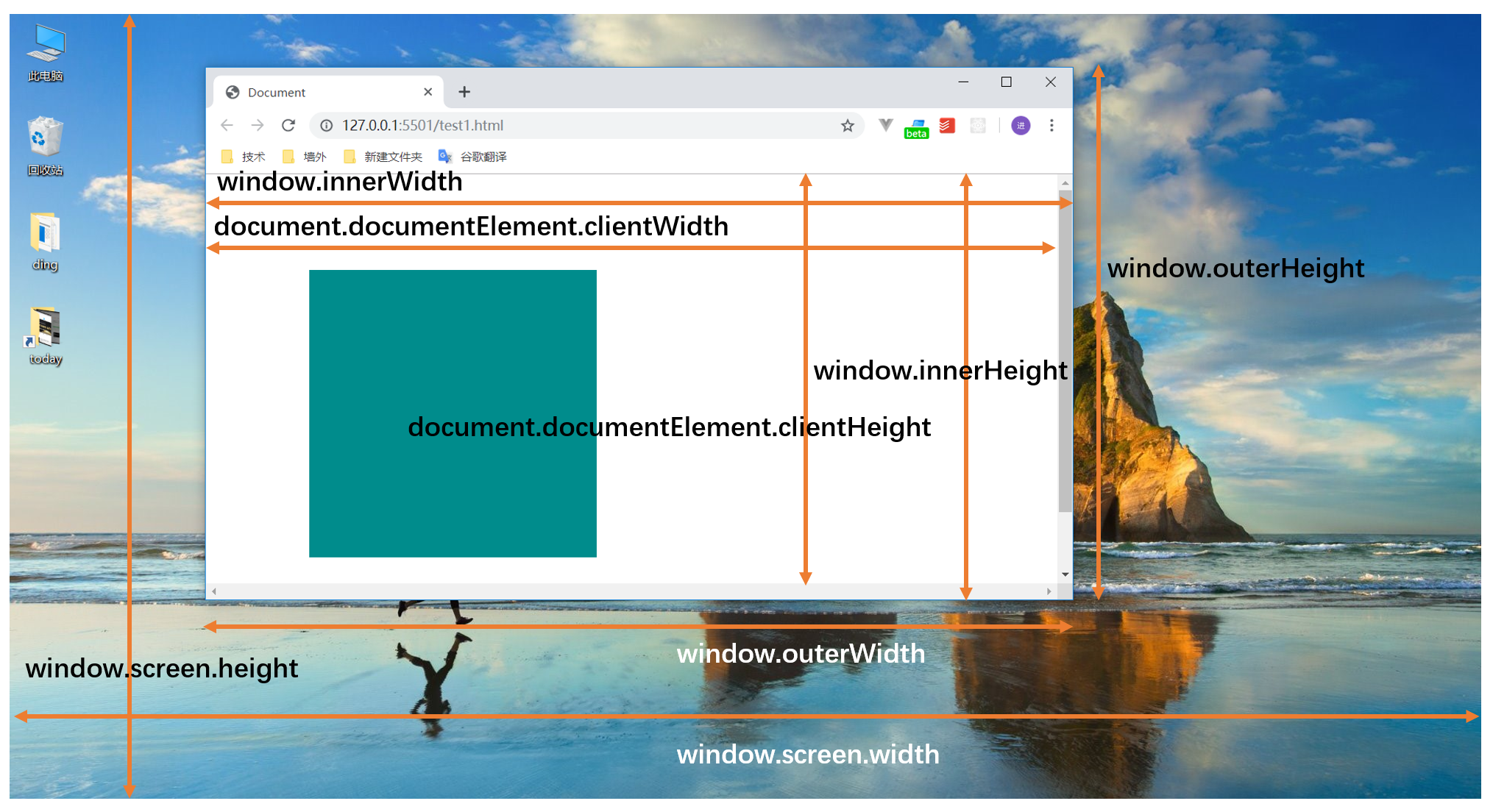
- window 的尺寸
| innnerWidth innerHeight | 浏览器内部尺寸(含滚动条) |
|---|---|
| clientWidth clientHeight | 视口内容区尺寸(不含滚动条) |
| outerWidth outerHeigtht | 浏览器外部尺寸 |
| screen.width screen.height | 屏幕宽高 |
| scrollX scrollY | 文档滚动偏移 |
| pageXOffset pageYOffset | 页面滚动的距离 |
window.scrollX、window.pageXOffset: 相当于根元素的scrollLeft window.scrollY、window.pageYOffset: 相当于根元素的scrollTop
方法:
- scrollTo()、scrollBy()
- resizeTo()、resizeBy() //只能设置通过js代码打开的窗口,对于用户自己打开的窗口无效。
- 元素的尺寸位置尺寸
| offsetWidth offsetHeight | 盒子实际尺寸占位( 包含内容 + 内边距 + 边框 + 滚动条) |
|---|---|
| clientWidth clientHeight | 盒子在可见内容区的尺寸 (包含内容 + 内边距,不含边框和滚动条宽度) |
| scrollWidth scrollHeight | 元素内容的总尺寸(包括被滚动条实际撑大的区域,不含边框) |
| scrollTop scrollLeft | 元素内部滚动与内容尺寸(内部内容滚动的距离) |
位置
| offsetParent | 获取某个元素第一个定位的祖先元素 如果没有则得到body |
|---|---|
| offsetTop offsetLeft | 相对于 offsetParent 的偏移量(受定位上下文影响) |
| getBoundingClientRect() | 获取元素的矩阵信息 视口坐标系(相对于视口) 包含内边距与边框,不含外边距 |
body的offsetParent为null,如果offsetParent是body,则将其当作是整个网页
- 鼠标事件参数
| clientX clientY | MouseEvent 鼠标位置(相对视口的坐标) |
|---|---|
| pageX pageY | MouseEvent 相对于文档的坐标 (包含滚动偏移) |
| offsetX、offsetY | 鼠标相对于事件源的内边距边缘的坐标 |
| screenX screenY | MouseEvent 相对于整个屏幕的坐标 |
| x、y | 等同于clientX、clientY |
| movementX、movementY | 只在鼠标移动事件中有效,相对于上一次鼠标位置,偏移的距离 |
movementX、movementY会随着笔记本缩放随着变化,100%下表现正常
- js 常用 API
scrollIntoView
将元素滚动到可是区域,不可设置具体的像素值
dom.scrollIntoView({
  block: "top",
  behavior: "smooth",
});
scrollTo/scrollBy
文档滚动控制,可指定具体坐标 scrollTo是指将滚动条设置到指定位置 scrollBy()是指在原来的位置上再增加/减少指定值
window.scrollTo({
  top: 50,
  behavior: "smooth",
});
ResizeObserver()
观测元素内容盒尺寸变化,替代轮询
const ro = new ResizeObserver((entries) => {
  for (const e of entries)
    console.log(e.contentRect.width, e.contentRect.height);
});

ro.observe(document.querySelector(".box"));
IntersectionObserver
是否与视口相交,常用于判断元素是否进入视口,懒加载常用
const io = new IntersectionObserver(
  ([e]) => {
    if (e.isIntersecting) {
      console.log("相交了");
    }
  },
  { threshold: 0.5 },
); //阈值:50%可见才触发

io.observe(document.querySelector(".box"));